
Download Stico Swap – AI‑Powered Sticker Creator for Fun Texting
Overview: Transform Your Texting Experience
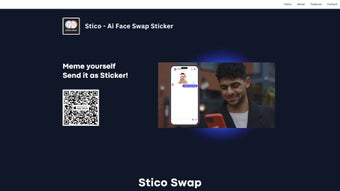
Stico Swap is a web‑based AI tool that brings a fresh, playful dimension to everyday messaging. In an age where emojis and GIFs dominate digital conversations, Stico Swap raises the bar by allowing users to craft truly personalized stickers from their own photos—whether it’s a selfie, a beloved pet, or a candid group shot. The platform’s core mission is simple yet powerful: make chat sessions memorable through interactive, customized visual content that reflects each user’s personality.
At its heart, Stico Swap blends easy‑to‑use editing utilities with sophisticated artificial‑intelligence features. Users can trim, rotate, and adjust images with intuitive controls, then apply AI‑driven enhancements like background removal, color correction, and style filters. The standout “Dynamic Face Swap” feature lets you exchange faces between subjects in a single click, creating humorous or surprising stickers that spark laughter and keep conversations lively. Because the tool operates entirely in the browser, there’s no need for heavyweight installations or device‑specific apps—just a stable internet connection and a modern browser.
Integration is another strong point. Once a sticker is created, Stico Swap generates a ready‑to‑share file that can be imported directly into popular messaging platforms such as WhatsApp, Telegram, iMessage, and Facebook Messenger. The workflow is seamless: create, download, and drop the sticker into a chat. This frictionless process encourages frequent use, turning ordinary text exchanges into a dynamic visual dialogue. Whether you’re a teenager looking for the next viral meme, a professional wanting a branded sticker for internal chats, or a parent sharing cute pet moments with family, Stico Swap offers a secure, free, and instantly rewarding way to elevate your digital voice.
Beyond pure fun, Stico Swap can also serve educational and marketing purposes. Teachers can design custom stickers for classroom gamification, while small businesses can produce brand‑aligned stickers for customer engagement without hiring a designer. The tool’s emphasis on privacy, with encrypted processing and automatic deletion of uploads, reassures users that their personal images remain confidential. In short, Stico Swap combines creativity, convenience, and security into a single, web‑based service that fits naturally into today’s fast‑paced, visually‑driven communication landscape.
Key Features That Set Stico Swap Apart
- AI‑Powered Face Swap: Instantly exchange faces in any photo, producing funny or surprising stickers with a single click.
- Personalized Sticker Generator: Convert selfies, pet pictures, or any image into a custom sticker ready for messaging apps.
- Advanced Editing Suite: Crop, rotate, adjust brightness/contrast, and apply artistic filters without leaving the browser.
- Background Removal: AI automatically isolates subjects, allowing transparent stickers that blend naturally into chats.
- One‑Click Export: Download stickers in PNG format with transparent backgrounds, optimized for fast sharing.
- Seamless Messaging Integration: Directly import stickers into WhatsApp, Telegram, iMessage, Signal, and more.
- Cross‑Platform Web Access: No desktop or mobile app required; works on any modern browser on Windows, macOS, Android, or iOS.
- Secure Cloud Processing: All AI operations happen over encrypted HTTPS connections; no personal images are stored long‑term.
- Free Tier with Optional Premium Add‑Ons: Core sticker creation is free, while advanced filters and batch processing are available via subscription.
- Community Gallery: Browse trending stickers created by other users for inspiration and ideas.
These features combine to create a robust, user‑friendly ecosystem that caters to both casual texters and power users. The AI engine, built on modern deep‑learning models, ensures high‑quality face swaps and background extractions even on low‑resolution images. Meanwhile, the straightforward UI means anyone can start designing stickers within minutes—no prior graphic design experience required. The free tier’s generous limits encourage experimentation, while the optional premium plan unlocks batch processing, higher‑resolution exports, and exclusive filter packs for creators who need more flexibility.
Another noteworthy aspect is the Community Gallery, which serves as a living showcase of what’s possible with Stico Swap. Users can up‑vote their favorite creations, comment on techniques, and even download public‑domain templates to remix. This social component fuels creativity and helps new users quickly grasp advanced tricks, such as combining multiple AI filters or layering text on top of stickers. Additionally, the platform supports multi‑language UI, making it accessible to a global audience without sacrificing performance.
Overall, Stico Swap delivers a balanced mix of creativity, convenience, and security that makes it a standout tool in the crowded messaging‑enhancement market. Whether you need a quick joke for a group chat or a polished visual asset for a brand campaign, the feature set is designed to adapt to any use case while keeping the experience light, fast, and enjoyable.
Installation & Compatibility: Getting Started on Any Device
Because Stico Swap is a cloud‑based web application, installation is virtually nonexistent. Users simply navigate to the official website using a supported browser, create a free account, and begin designing stickers instantly. The platform is optimized for the latest versions of Chrome, Firefox, Safari, and Edge, ensuring smooth performance across desktop and mobile environments. For those who prefer a dedicated shortcut, Stico Swap offers a progressive web app (PWA) option: click “Add to Home Screen” on mobile browsers to create an app‑like icon that launches the service in a full‑screen window, mimicking a native app without consuming device storage.
In terms of operating system compatibility, Stico Swap runs flawlessly on Windows 10/11, macOS Monterey and later, as well as Linux distributions that support modern browsers. Mobile users on Android 8.0+ and iOS 13+ can access all core features, including the Dynamic Face Swap, directly from their phones or tablets. The responsive design automatically adapts the interface layout to fit different screen sizes, providing a consistent experience whether you’re on a 27‑inch monitor or a 5‑inch smartphone.
To ensure a secure experience, Stico Swap enforces HTTPS encryption for all data transfers. Uploaded images are processed in memory and discarded after the sticker is generated, meaning personal photos are never stored on the server longer than necessary. For users concerned about privacy, the platform complies with GDPR and CCPA standards, offering clear consent dialogs and the ability to delete any stored data on request.
Getting started is as simple as these three steps:
- Visit sticoswap.com and click “Sign Up” using an email address or Google account.
- Upload a photo, adjust the canvas with the built‑in editor, and apply the Face Swap or any other AI filter.
- Download the finished PNG sticker and insert it into your favorite messaging app.
Because the entire workflow lives in the browser, updates are instantaneous. Whenever Stico Swap releases a new AI model or adds a feature, users receive the improvement on the next page load—no manual patching required. This continuous delivery model keeps the tool fresh, secure, and aligned with the latest trends in visual communication. Additionally, the platform offers an optional “offline mode” for premium subscribers, allowing users to cache the UI assets for faster load times on slow connections, though the AI processing still requires an internet link.
Pros, Cons, and Frequently Asked Questions
Pros
- Instant, web‑based access—no heavy downloads or installations.
- AI‑driven Face Swap creates unique, humorous stickers in seconds.
- Comprehensive editing tools for precise image adjustments.
- Seamless integration with major messaging platforms.
- Free core features; premium options available for power users.
- High‑privacy standards with encrypted processing and GDPR compliance.
- Responsive design works on desktops, tablets, and smartphones.
- Community Gallery inspires creativity and provides ready‑made templates.
Cons
- Advanced premium features require a subscription.
- Performance may vary on very old browsers or low‑end devices.
- Batch processing is limited to paid tiers.
- Internet connection required for all operations.
- Export formats are currently limited to PNG; no SVG or animated GIF support yet.
FAQ
Is Stico Swap completely free to use?
The core sticker‑creation tools, including Face Swap and basic editing, are free. Premium features such as batch processing, high‑resolution exports, and exclusive filters are offered via a monthly subscription.
Do I need to download any software to create stickers?
No. Stico Swap runs entirely in your web browser. You can also add it as a progressive web app for an app‑like experience, but no installation is required.
Which operating systems are supported?
Stico Swap works on Windows 10/11, macOS Monterey and later, Linux (via modern browsers), Android 8.0+, and iOS 13+. Any device with a recent browser that supports HTML5 and WebGL will run the tool smoothly.
How secure is my uploaded image?
All uploads are processed over HTTPS and are kept in memory only for the duration of the editing session. Images are automatically deleted from the server after the sticker is generated, and Stico Swap complies with GDPR and CCPA regulations.
Can I use the stickers in any messaging app?
Yes. Stico Swap exports stickers as PNG files with transparent backgrounds, which can be imported into WhatsApp, Telegram, iMessage, Signal, Facebook Messenger, and most other chat platforms that support custom stickers.
Is there a limit to how many stickers I can create for free?
The free tier allows up to 30 stickers per month, which is sufficient for casual use. Power users who need higher volumes can upgrade to the premium plan for unlimited creation.
Conclusion & Call to Action
Stico Swap delivers a compelling blend of AI technology, user‑friendly design, and cross‑platform accessibility that makes personalized sticker creation effortless for anyone who wants to stand out in digital conversations. By turning ordinary photos into expressive, share‑ready stickers, the tool adds a layer of personality that standard emojis simply cannot match. Whether you’re looking to inject humor with a quick face swap, showcase your pet’s cutest expression, or brand your corporate chats with custom graphics, Stico Swap offers a secure, free, and instantly updated solution that works wherever you type.
Ready to make your messages unforgettable? Visit the official site, sign up for a free account, and start crafting stickers that reflect your unique style. For power users, the premium subscription unlocks batch workflows and high‑definition exports, turning Stico Swap into a full‑featured design hub. Embrace the future of visual texting—download Stico Swap today and let your conversations come to life.
Stico Swap offers a fun, secure, and easy way to create custom stickers. The AI face swap is impressive, and the web‑based approach means no installations. While premium features require a subscription, the free tier is generous enough for casual users.
- Pros: Instant web access, powerful AI, free core features.
- Cons: Requires internet, premium tier for batch work.



.png)



